# Focus Reading
Focus Reading is a reading aid that bolds the first portion of each word, guiding your eyes to natural fixation points and helping you read faster with less effort. Some readers — particularly those with ADHD — find it helps them stay engaged with the text and reduces mind-wandering. It is inspired by the Bionic Reading technique.
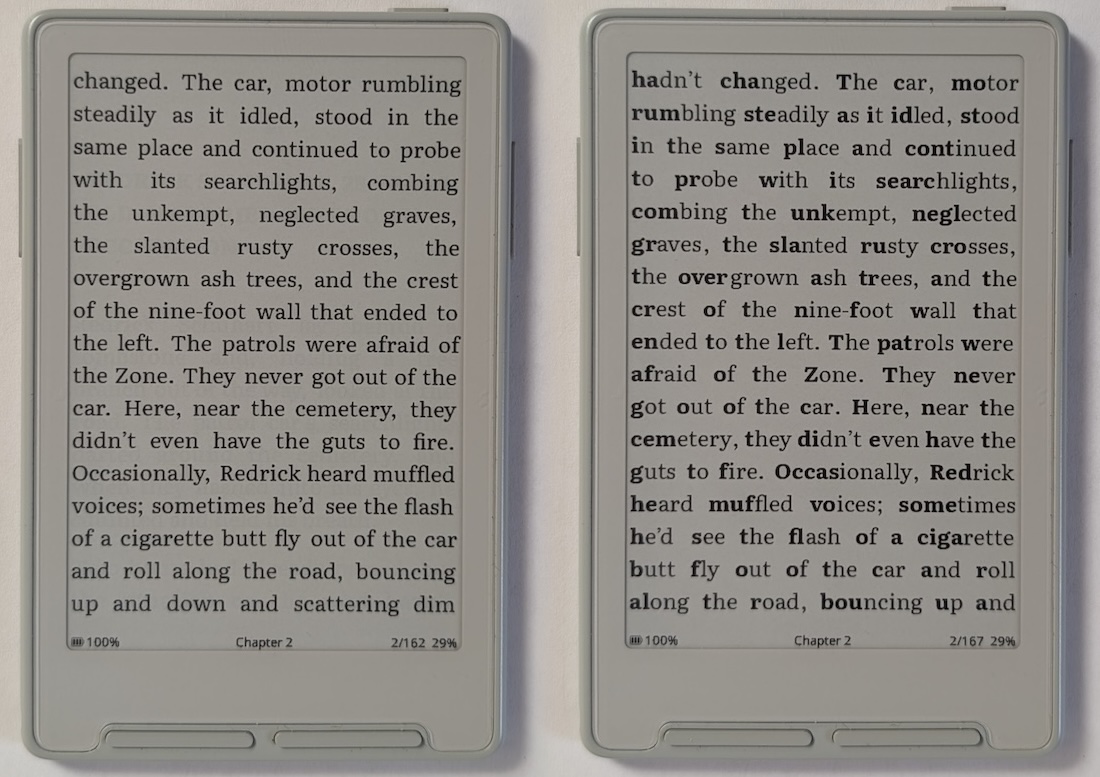 *Left: Focus Reading off. Right: Focus Reading on. Both using Literata.*
## Enabling Focus Reading
1. Open **Settings > Reader**
2. Toggle **Focus Reading** on
Toggling the setting invalidates affected EPUB section caches for the current layout, the same as changing font settings. Sections are rebuilt on demand, then page turns proceed as normal. No changes are made to your EPUB files.
## Examples
*Left: Focus Reading off. Right: Focus Reading on. Both using Literata.*
## Enabling Focus Reading
1. Open **Settings > Reader**
2. Toggle **Focus Reading** on
Toggling the setting invalidates affected EPUB section caches for the current layout, the same as changing font settings. Sections are rebuilt on demand, then page turns proceed as normal. No changes are made to your EPUB files.
## Examples
 *Focus Reading with Noto Serif font*
 *Focus Reading with Merriweather font*
 *Focus Reading with Atkinson Hyperlegible Next font*
## Notes
- Focus Reading only applies to regular body text. Already-bold text (headings, emphasis) is left unchanged.
- The setting is per-device, not per-book — it applies to all books while enabled.
*Focus Reading with Atkinson Hyperlegible Next font*
## Notes
- Focus Reading only applies to regular body text. Already-bold text (headings, emphasis) is left unchanged.
- The setting is per-device, not per-book — it applies to all books while enabled.