# Focus Reading
Focus Reading is a reading aid that bolds the first portion of each word, guiding your eyes to natural fixation points and helping you read faster with less effort. Some readers — particularly those with ADHD — find it helps them stay engaged with the text and reduces mind-wandering. It is inspired by the Bionic Reading technique.
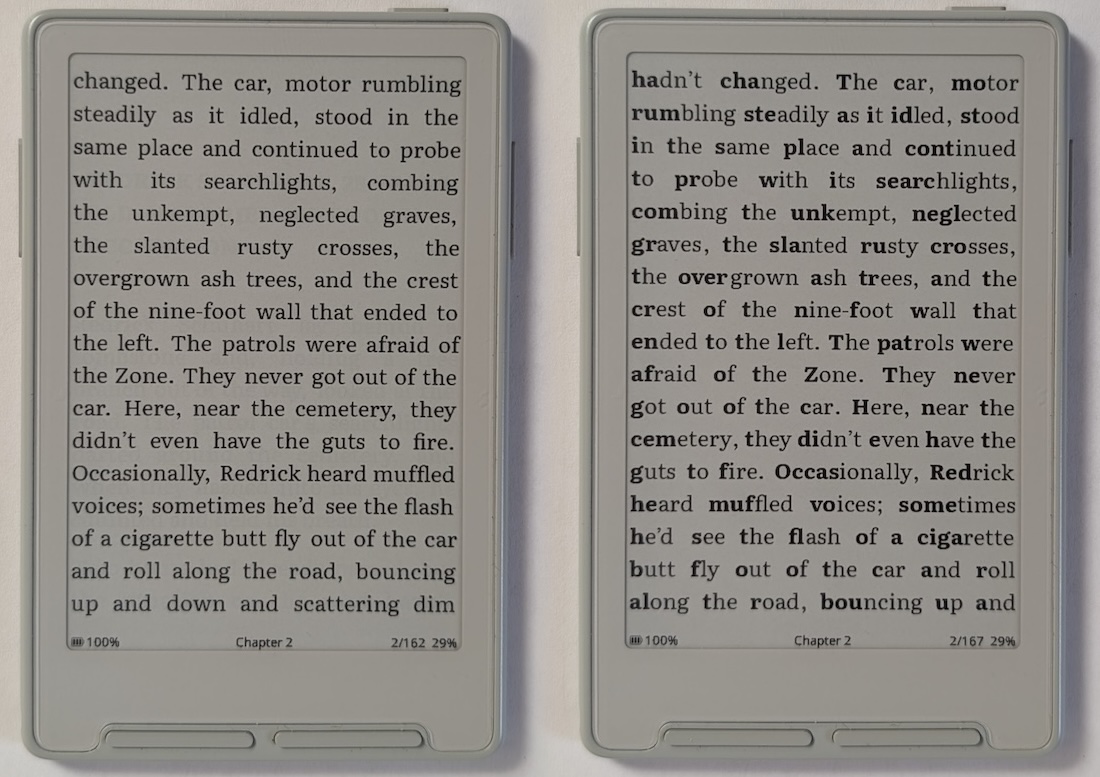 *Left: Focus Reading off. Right: Focus Reading on. Both using Literata.*
## Enabling Focus Reading
1. Open **Settings > Reader**
2. Toggle **Focus Reading** on
Toggling the setting will trigger a re-index of your current book, the same as when changing font settings. Once indexing is complete, page turns proceed as normal. No changes are made to your EPUB files.
## Examples
*Left: Focus Reading off. Right: Focus Reading on. Both using Literata.*
## Enabling Focus Reading
1. Open **Settings > Reader**
2. Toggle **Focus Reading** on
Toggling the setting will trigger a re-index of your current book, the same as when changing font settings. Once indexing is complete, page turns proceed as normal. No changes are made to your EPUB files.
## Examples
 *Focus Reading with Noto Serif font*
 *Focus Reading with Merriweather font*
 *Focus Reading with Atkinson Hyperlegible Next font*
## Notes
- Focus Reading only applies to regular body text. Already-bold text (headings, emphasis) is left unchanged.
- The setting is per-device, not per-book — it applies to all books while enabled.
*Focus Reading with Atkinson Hyperlegible Next font*
## Notes
- Focus Reading only applies to regular body text. Already-bold text (headings, emphasis) is left unchanged.
- The setting is per-device, not per-book — it applies to all books while enabled.